Ripper Casino Mobile Play on iPhone, Android and Tablet
Updated November 2026
Licensed
 Available in AU
Fast payouts
18+ Only

Mobile play
Ripper Casino’s current mobile access route is browser-based. Its current site says mobile play works without downloading an app and that the platform adapts to smartphones and tablets. For iPhone and Android users, the practical starting point is therefore the casino website in the device browser rather than an App Store or Google Play installation.
The browser-first setup keeps the same account journey in one place: open the site, use the existing login or registration route, then move into games and banking from the responsive interface. Ripper also offers live dealer games, but game availability and performance can vary by device, browser and connection, so the useful question is whether the mobile site covers the functions you actually need.
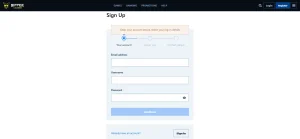
Before launching mobile browser pokies on iOS or Android devices, make sure to set up your profile using our Ripper Casino registration and login walkthrough.
Browse Ripper games
Mobile login and registration
App or browser
The current Ripper site explicitly describes its mobile platform as in-browser and says no app download is required. That is the clearest answer to the common app question. On both iPhone and Android, the normal route is to open the casino site in a modern browser and use the responsive version of the platform.
A matching name in an app store is not enough to establish that an app belongs to this casino. Unless Ripper itself links to a native listing, the browser route is the relevant product experience.
The browser-first route also means the live website remains the reference point for access. You do not need a separate install package to reach the account, and there is no reason to rely on an unrelated store listing just because it uses a similar name. If Ripper changes its official mobile route, that change should be confirmed from the casino itself rather than inferred from an app-store search.
For regular mobile use, save the correct site entry point and check it before signing in, especially if you have previously followed links from search results or messages. The important product fact is still the same: the documented Ripper experience runs in the browser, so the account and cashier should be approached through the current web interface.
Table of Contents
- Mobile Browser Gameplay, Android Access and Device Compatibility
- What changes between phone platforms
- Mobile value depends on the games you actually play
- Keep mobile banking decisions separate from screen convenience
- Account and support access matter more than an app icon
- What to test before using Ripper mainly from a phone
- When Ripper's browser-first mobile setup is the practical choice
Mobile Browser Gameplay, Android Access and Device Compatibility
iPhone and Android
A useful device check covers the tasks that matter beyond the landing page. Sign in with the existing account, open the account area, move into the game category you actually use, confirm that the cashier can be reached, and locate the support control. If one of those functions is awkward on a particular phone, that limitation matters more than whether the home page itself looks polished.
Changing from desktop to phone should not be treated as a reason to create a second account. The same account rules continue to apply, including the one-account principle and the later verification connection. Mobile convenience comes from using the existing account through a smaller interface, not from creating a separate mobile profile.
What changes between phone platforms
Because the main route is a responsive website, the core access model is similar on iPhone and Android: open the site, sign in, and use the interface that adapts to the screen. You do not need a different Ripper account for each device. The differences that matter are mostly outside the casino itself. Browser version, screen size, operating-system updates, network quality and device memory can all affect how quickly a game or live stream loads. That is why a broad promise of identical performance across all phones would be misleading. If you move between desktop and mobile, keep the same account credentials and use the existing login route. The mobile login and registration covers registration, login and verification without duplicating those steps here.
Games on a smaller screen
Ripper’s catalogue includes pokies, crash games, scratch cards, table games and live dealer games. The browser-first setup means those categories are reached through the site rather than a separate mobile catalogue. For the full provider and category picture, use the Ripper games page instead of assuming every desktop title behaves identically on a phone.
Pokies and simple instant-play formats are usually the easiest fit for a narrow screen because controls can be arranged around a single game canvas. Live dealer games add video, table controls and more persistent data transfer, so connection quality matters more. Ripper’s terms confirm that live dealer games are available, but they do not promise uniform performance across every phone or network.
A practical mobile check is therefore about fit rather than raw catalogue size. Open the specific game you care about, confirm that the controls are readable without awkward zooming, and make sure the session remains stable before committing to longer play.
Game-by-game testing matters because the browser is only the container. A simple pokie interface and a streamed live table place different demands on screen space and connection stability. If live dealer play is important to you, open the current live category on the device you plan to use and confirm that the video, controls and table information remain usable before relying on mobile as the main way to play.
Mobile value depends on the games you actually play
Cashier access
A responsive site can make the cashier easier to reach on a phone, but it does not change the underlying payment rules. Deposit methods and withdrawal methods are not identical, and transaction limits or fees still belong to the payment method rather than the device used to open the site.
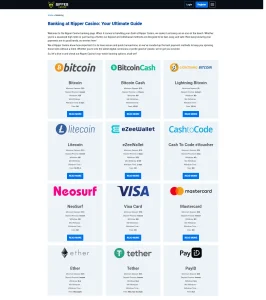
For Australians, Ripper’s current banking information includes options such as PayID, cards, Neosurf, Bitcoin and bank transfer across the broader banking mix. Before depositing from a phone, compare the actual method details on the mobile banking options page so the later withdrawal route is not an afterthought.
The useful mobile habit is to slow down at the transaction screen. A small display makes it easier to miss a minimum, fee or bonus condition if you rush. Read the method details, confirm the amount and keep the transaction record before leaving the page.
The same principle applies to cashouts. A method that is easy to select on a phone is not automatically the best withdrawal route, and the device does not remove verification or method restrictions. Choose the banking route from the actual cashier information, then use mobile only as the interface for carrying out that choice.
Keep mobile banking decisions separate from screen convenience
Help on mobile
Ripper provides 24/7 live chat support. On a phone, that support route is more useful than a native app badge if you are dealing with login, verification or a banking problem. If the chat control is available in your current mobile session, use it for immediate account help; otherwise, move to the support route exposed by the site.
The same logic applies to registration and login. Browser access keeps the account entry point tied to the live platform rather than to a downloaded package that could become outdated. If access fails, use the existing account recovery or support path instead of installing an unrelated app with a similar name.
For security, avoid saving passwords on a shared device and be careful with public Wi-Fi when opening account or cashier screens. Those are sensible mobile-account habits, not claims about a special security feature provided by Ripper.
Account and support access matter more than an app icon
Mobile checklist
What to test before using Ripper mainly from a phone
Interface
- Open the site in the browser you normally use.
- Check that login, navigation and game controls fit the screen comfortably.
- Test the exact game category you plan to use, especially live dealer.
Account and money
- Confirm you can reach the account area without creating a second profile.
- Read deposit and withdrawal method details before transacting.
- Know where the support route appears before you need it.
Best fit
Ripper’s mobile setup suits players who want to use the same website and account across phones, tablets and desktop without installing a separate casino app. The strongest reason to use it is convenience: open the browser, sign in and move between games, account functions and banking from one responsive interface. The trade-off is that performance still depends on the particular phone, browser, connection and game, especially for live dealer streams. If those basics work well on your device, the lack of a required native app is not a disadvantage – it is simply how the current Ripper mobile experience is designed.
Experience smooth touchscreen pokies and fast AUD deposits directly at Ripper Casino Australia.
For the broader product, banking and Australian context, see the Ripper Casino Australia review.